


Le November 13, 2025, par Joris Vinière.
PHP / Symfony Bundle: Going Further
Introduction
A bundle is an application extension (plugin) designed to add technical features that meet a defined scope. It is composed of a set of structured files; see our previous article.
In this article, we'll show you how to make a bundle configurable and display its name and version in your application's Symfony Profiler.
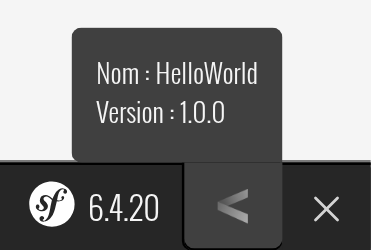
To do this, we'll first need to modify the bundle class to add a configuration section. Although empty by default, this class is useful and allows you to customize the behavior of the bundle. We will then need to create a configuration file in our application that will be used for the bundle. Finally, we will finish by using Symfony's DataCollectors to be able to display the information we want in the profiler.
First, our goal will be to define the possible configuration of our bundle, for this we will use the "configure" function:
// src/HelloWorldBundle.php
<?php

namespace IDCI\Bundle\HelloWorldBundle;

use Symfony\Component\Config\Definition\Configurator\DefinitionConfigurator;
use Symfony\Component\DependencyInjection\ContainerBuilder;
use Symfony\Component\DependencyInjection\Loader\Configurator\ContainerConfigurator;
use Symfony\Component\HttpKernel\Bundle\AbstractBundle;

class HelloWorldBundle extends AbstractBundle
{
	public function configure(DefinitionConfigurator $definition): void
	{
		$definition->rootNode()
			->children()
				->arrayNode('app')
					->isRequired()
					->children()
						->scalarNode('name')->isRequired()->end()
						->scalarNode('version')->isRequired()->end()
					->end()
				->end()
			->end()
		;
	}
}
 Check the example
Several concepts are quite important in the code above, and we'll explain them in detail.
The configure() method is used to define or import the bundle's possible configuration from one or more files. This method uses Symfony's TreeBuilder, which allows you to hierarchically organize the parameters expected by our bundle.
In our case, we indicate that the bundle requires several parameters:
- name under the app configuration key
- version under the app configuration key
We can now add the bundle's configuration file to our application:
// YourApp/config/packages/idci_hello_world.yaml
hello_world:
	app:
		name: HelloWorld
		version: 1.0.0
You can freely assign values to the parameters, however we use the naming convention Semantic Versioning. The general idea is to name your version after the structure X.Y.Z, where X represents a major change, Y a minor change, and Z a fix. For the first version, we therefore choose 1.0.0.
We will now associate the values defined in the bundle configuration with parameters in the dependency injection container:
// src/HelloWorldBundle.php
<?php

namespace IDCI\Bundle\HelloWorldBundle;

use Symfony\Component\Config\Definition\Configurator\DefinitionConfigurator;
use Symfony\Component\DependencyInjection\ContainerBuilder;
use Symfony\Component\DependencyInjection\Loader\Configurator\ContainerConfigurator;
use Symfony\Component\HttpKernel\Bundle\AbstractBundle;

class HelloWorldBundle extends AbstractBundle
{
	public function configure(DefinitionConfigurator $definition): void
	{
		$definition->rootNode()
			->children()
				->arrayNode('app')
					->isRequired()
					->children()
						->scalarNode('name')->isRequired()->end()
						->scalarNode('version')->isRequired()->end()
					->end()
				->end()
			->end()
		;
	}

	public function loadExtension(array $config, ContainerConfigurator $container, ContainerBuilder $builder): void
	{
		$builder->setParameter('hello_world_bundle.app_name', $config['app']['name']);
		$builder->setParameter('hello_world_bundle.app_version', $config['app']['version']);
	}
}
loadExtension(): Method called at compile time, allows you to load service definitions from configuration files.
Now that we've added the configuration, we want to make sure the settings are taken into account. To do this, we can use the following command to display the parameters of the registered services:
php bin/console debug:container --parameters
We can see that our two parameters have been taken into account:

Next, we'll see how to use Symfony's DataCollector to display information in the Profiler:
<?php

namespace IDCI\Bundle\HelloWorldBundle\DataCollector;

use Symfony\Component\HttpFoundation\Request;
use Symfony\Component\HttpFoundation\Response;
use Symfony\Component\HttpKernel\DataCollector\DataCollector;

class HelloWorldDataCollector extends DataCollector
{
	public function __construct(
		private string $appName,
		private string $appVersion,
	) {
	}

	public function collect(Request $request, Response $response, \Throwable $exception = null): void
	{
		$this->data['hello_world.app_name'] = $this->appName;
		$this->data['hello_world.app_version'] = $this->appVersion;
	}

	public function reset(): void
	{
		$this->data = [];
	}

	public function getName(): string
	{
		return 'hello_world.data_collector';
	}

	public function getAppName(): string
	{
		return $this->data['hello_world.app_name'];
	}

	public function getAppVersion(): string
	{
		return $this->data['hello_world.app_version'];
	}
}
collect(): Collects data into local properties
reset(): This method is called between each request to clear the information contained in the Profiler.
getName(): Returns the Collector's name (its identifier). This name must be unique and it's best to make it follow conventions (short, lowercase, and without spaces).
We also add two methods that will be used to retrieve the two parameters we want to display in the Profiler.
We then need to add a template file that will allow us to structure the display of this information.
	{% extends '@WebProfiler/Profiler/layout.html.twig' %}

	{% block toolbar %}
		{% set icon %}
			<img src="data:image/png;base64,iVBORw0KGgoAAAANSUhEUgAAAEAAAABACAYAAACqaXHeAAAABGdBTUEAALGPC/xhBQAAAAFzUkdCAdnJLH8AAAAgY0hSTQAAeiYAAICEAAD6AAAAgOgAAHUwAADqYAAAOpgAABdwnLpRPAAAAAZiS0dEAP8A/wD/oL2nkwAAAAlwSFlzAAALEwAACxMBAJqcGAAAAAd0SU1FB+kJEAoFNPHCUCIAAAXSSURBVHja7ZptaFV1HMe/3985t213jq6GZCBkUZQUWSiolCFihYT04CTR9O7BueseYps4kCmb0nB6Qa6ic2uKGQXTNyk90JvIIOtFUPZGWL1IiCICIXS7ez6/XnSPHI7neB98OnecL1zu2f/swL6f3+/3/f93NyBUqFChQoUKFarIdfz4cbOQ51jsxo8dO/a0iNSTXArgxUQiofk8bxaj6UOHDpki8oqINAJ4VVUjJIfI/OtZVACSyeQckpsBJAA8BYCqCpJQVajqzASwf//+Z0kmLMvaZBhGDMANw/aL5MT27dt1xgDYt29fhOQaEWlW1ZUATGelndeFVj+QALq6uuaSrAKwDcATtlmvqrvXihZAR0cHSS4SkQZV3QCgwhloTnOutr/pflEBaG9vLxGRtaraBGCFqgqAG+19Y692wfCYf1iWVTwA2tra5olILYCtqrrAWU3bpF8HuLc6dzcEFkBDQ4OYprmYZKOqVqpqudccu9va7oZcciCQABKJRBnJN0k2qepyZpzcKs29usEPwu3mwF0DUFNTM19EtlqWVSsi871M5rKleY2C6/tHVfU8gCP3HUBVVZVMT08vE5FGVX1LVcu8Qsures7g86usa+2Kqp4A8GFra+uf93UX2LBhQznJ9RMTEw0iskRV6TerPqc4z3ePDpgCcAHAcQCft7e3T9zuz35bANavX7+AZJ2q1pCc57VV+c1ytkONq9pXSX6iqv27d+++fCe71izAtFiWtYJkE4C1AErc1fVLbD+DPlAUwCWSfQAG9+zZc+1uZFVeAKqrq1cMDw8fAbDI/k3Maz5vFW7ZwhDAKIBzqtpL8oeurq7pu7lL5QUgGo0uKy0tfX5sbAzpdBrT09PZEjqnV+aZ31X1pKqe6u7u/utenU/yHYGIiCAajaK8vByTk5NIp9MYHx/3PMX5haAz1FT1QqbaXx48eHD8Xp9K8wKgqrSrTBIlJSUoKyuDZVlIp9MYGRm56WTm0+5XVfVjkh+kUqnLuI/KOwRt886XaZqIxWKIxWIYGxvD9evXMTU15d7CVFUvqWqfZVmDvb291xAAFfZJasaYG4SIYNasWaioqMDExASGh4cxOjo6YlnWeZJ9lmVdHBgYsBAgmbdj3t0VzuuysjJEo1EA+NcwjF9I/tbZ2Rko80CeH4s3NjZ2kHxfRCAiN6puv9vXzq8dayMkz5HsJ3mxo6MjEDCk0AzwGgX3WLieKye5ieS3IvJTT09Pw4EDB2YX1Qj4GXWb9lvP3CPJRQCOkexOJpNnM13x844dOzTQHXCrintV36ML3PdiJLeR/JHkd6lUasvhw4dnBTYDmpubF4vIQRFZSVI85tw3E7zu+6z/Q/JjkgORSGSovr5eAwMAAFpaWigiS0i2isjbJEuyBaI7GHMEMkXyGxHpJ/lFfX39WCAAOLVz587HRKSJZLWIzPYyc4eu/yB5iuSpurq6K4EBYGvXrl1zRKSWZCPJR/0qnetIuK8B2GvjJL8SkT4R+Toej08GAoCtzs7OUgCVJFtJvsD/gyLbzHuu53D9K8mTJD/avHnz34EAYGvv3r0GyVUk20iuFhHTywhJGIbhrHBW8x730iQ/Jdm7cePG7wMBwKnu7u7nSLaIyDsko/m0vt+4+EAZikQiCysrKzVQAGz19PTMJ9kgIltJzi0kFLPAG4pEIgvXrVsXTAC2ksnkgyS3iEgzySdzNZ7DiBQHAFupVOoBAG9kAnOpiEihIDI7RXEBsHX06FGq6ksk20TkdZKRbKZ9xmDINM3iA+BUb2/vwsxovEuyIs9RKH4Atvr7+x8mWS8iCZKP5LhFDhmGMTMA2Dpx4kQ5yU0i8h7JZ7J0w8wDYOv06dMmgDWZnHiZpLgBACgIgBQDgHg8PhWPxz+zLGsVgOUABkmOO/8WEaij8L3Q4ODg4wCaRaQKQKzQDij6/xU+e/bsQwBqVXW1YRiv5XsUnjE6c+aMiVChQoUKFSpUqFC56z8JEpv6DPlW1AAAAABJRU5ErkJggg==">
		{% endset %}

		{% set text %}
			<div class="sf-toolbar-info-group">
				<div class="sf-toolbar-info-piece">
					<p>Nom : {{ collector.appName }}</p>
					<p>Version : {{ collector.appVersion }}</p>
				</div>
			</div>
		{% endset %}

		{{ include('@WebProfiler/Profiler/toolbar_item.html.twig', { link: true, name: 'hello_world.data_collector', additional_classes: 'sf-toolbar-block-right' }) }}
	{% endblock %}
We can now create the link between our DataCollector and our template. To do this, we'll define the service in the bundle's services.yaml file, specifying the template's location and passing the dependency injection container parameters created earlier as arguments.
// config/services.yaml
services:
	IDCI\Bundle\HelloWorldBundle\DataCollector\HelloWorldDataCollector:
		tags:
		-
			name: 'data_collector'
			template: '@HelloWorld/collector/hello_world.html.twig'
			id: 'hello_world.data_collector'
		arguments:
			$appName: '%hello_world_bundle.app_name%'
			$appVersion: '%hello_world_bundle.app_version%'
Finally, we will load this configuration file via the bundle class.
// src/HelloWorldBundle.php
<?php

namespace IDCI\Bundle\HelloWorldBundle;

use Symfony\Component\Config\Definition\Configurator\DefinitionConfigurator;
use Symfony\Component\DependencyInjection\ContainerBuilder;
use Symfony\Component\DependencyInjection\Loader\Configurator\ContainerConfigurator;
use Symfony\Component\HttpKernel\Bundle\AbstractBundle;

class HelloWorldBundle extends AbstractBundle
{
	public function configure(DefinitionConfigurator $definition): void
	{
		$definition->rootNode()
			->children()
				->arrayNode('app')
					->isRequired()
					->children()
						->scalarNode('name')->isRequired()->end()
						->scalarNode('version')->isRequired()->end()
					->end()
				->end()
			->end()
		;
	}

	public function loadExtension(array $config, ContainerConfigurator $container, ContainerBuilder $builder): void
	{
		$builder->setParameter('hello_world_bundle.app_name', $config['app']['name']);
		$builder->setParameter('hello_world_bundle.app_version', $config['app']['version']);

		$container->import('../config/services.yaml');
	}
}
With this you will have access to your bundle information in the Symfony profiler!